6 tips for a social video, each with the evidence behind it
Six tips tied to a survey, a platform’s own rules, research or a regulator’s guidance, and where each source stops.
First published at this address: · Rewritten by Moovly Team,

Much advice on social video cannot be checked. These six tips are the ones we could tie to something checkable: a large survey, a platform’s own rules, research on how people follow video, or a regulator’s guidance. Where a tip rests on research from classrooms and not from feeds, it says so.

1. Choose the platform by who is on it
In the United States, a Pew Research Center survey of 5,511 adults in 2026 found that 84% use YouTube, 70% Facebook, 51% Instagram and 37% TikTok. Age changes the picture: 79% of adults under 30 use Instagram and 65% use TikTok, while among those 65 and over the figures are 21% and 11%. Facebook is steadier across ages, from 69% of the youngest group to 59% of the oldest.
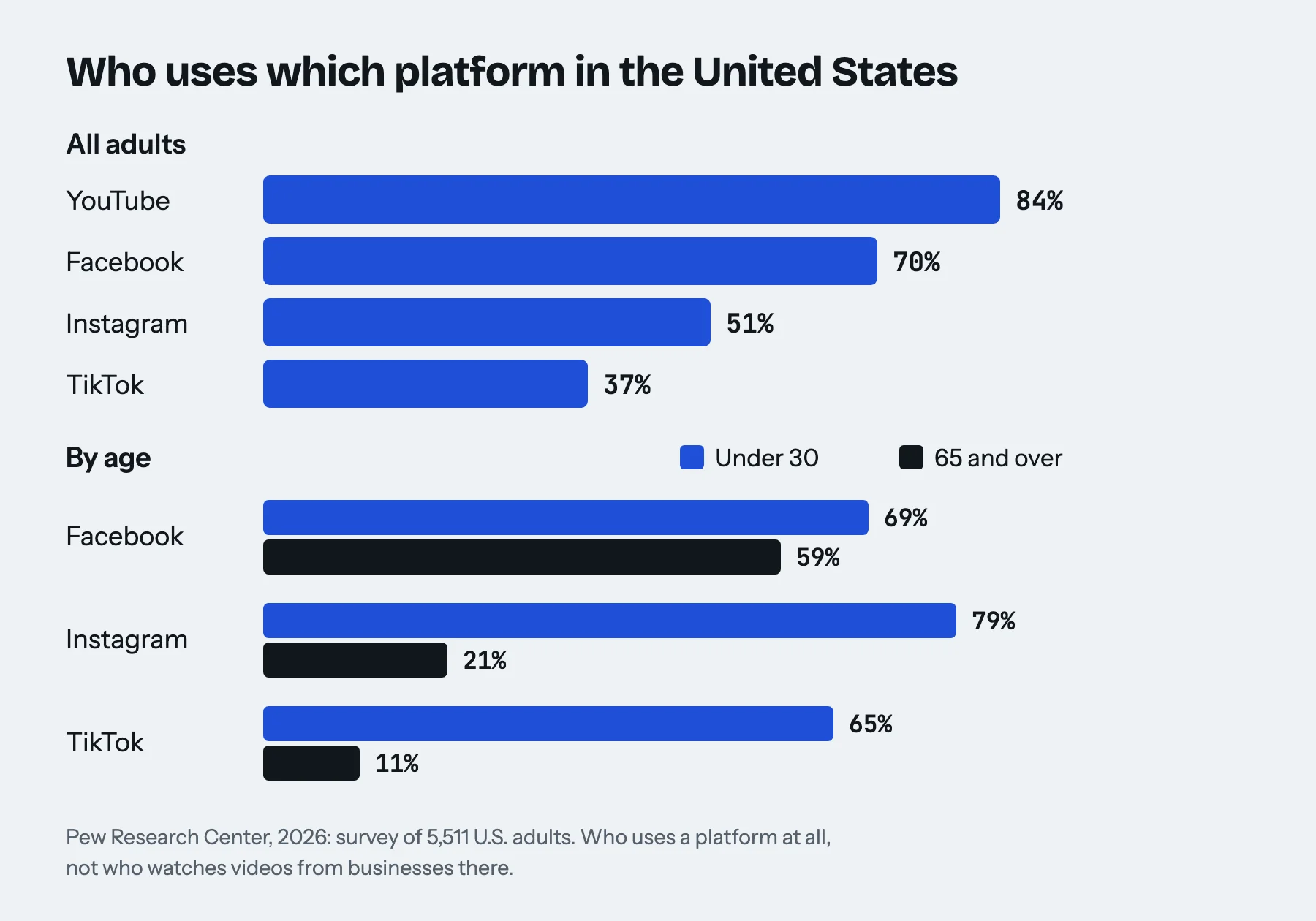
These are U.S. numbers and say who uses a platform at all, not who watches videos from businesses there. They are still a better start than habit: decide who the video is for, then post where that group is.
2. One idea, and stop
The platforms themselves define “short”: YouTube describes Shorts as videos up to 3 minutes long. That is a ceiling, not a target. What evidence we know of on length comes from online courses, where a review of research reports that videos under 6 minutes were typically watched almost to the end and longer ones were not. People in a feed chose nothing in advance, so do not treat that as a number for social video; treat it as the reason to make one point and end when it is made.
3. Shoot for the shape of the screen
YouTube’s instructions say Shorts are uploaded as vertical videos. A wide video placed in a vertical feed is shrunk to a strip, so decide where the video will be seen before recording and hold the phone that way. If one recording has to serve both a web page and a feed, keep the subject in the middle of the frame so that either crop keeps it.
4. Caption everything
Captions make a video usable with the sound off, and for viewers who are deaf or hard of hearing the web accessibility standard requires them. They are not only for those viewers: a large body of studies finds that captions improve understanding and recall for everyone.
Automatic Subtitles drafts the captions from what is said in the video, in a limited set of languages. Correct the draft by hand, names and numbers first. If your audience reads another language, Subtitle Translation gives a machine translation of the file for a fluent reader to check.
5. Talk like a person, and show what you mean
Two findings from the same review of teaching research apply to any explanation. Conversational language, compared with formal language, had a large effect on learning. And an explanation works better when the picture shows the thing the voice is naming, than when a face talks about something the viewer cannot see. For a social video that means: say it the way you would to a customer in front of you, and point the camera at the product, the screen or the result while you say it.
The research was done with students. That people prefer being spoken to plainly is hardly limited to classrooms, but that step is ours, not the review’s.
6. Say so when someone was paid, gifted or is on the payroll
If a customer, an employee or a creator praises your product in a video, the connection matters. In the United States, the Federal Trade Commission’s guidance on endorsements says an endorsement must reflect the endorser’s honest opinion, and that a connection viewers would not expect, such as being an employee or a relative, or having been paid or given something of value, should be disclosed clearly and conspicuously. Its own example is a video review of a resort by someone who stayed there free: the reviewer should tell viewers.
This is guidance from the United States; check the rules of your own country. Wherever you are, saying it in the video itself, in plain words and near the start, is the straightforward way to be honest about it.
After posting
Pick one thing that the video was meant to change, such as visits to one page or inquiries about one product, and look at that, not at views. A video can be widely seen and change nothing. Keep the recording: the same clip can sit on your own website, where it will still be found after the feed has moved on.
Questions and answers
Which platform should you choose for a social video?
Choose by who is on it. In the United States, a Pew Research Center survey of 5,511 adults in 2026 found that 84% use YouTube, 70% Facebook, 51% Instagram and 37% TikTok, and that 79% of adults under 30 use Instagram and 65% use TikTok. These numbers say who uses a platform at all, not who watches videos from businesses there.
How long should a social video be?
YouTube describes Shorts as videos up to 3 minutes long, and that is a ceiling, not a target. The article’s advice is to make one point and end when it is made.
Should a social video be vertical?
YouTube’s instructions say Shorts are uploaded as vertical videos, and a wide video placed in a vertical feed is shrunk to a strip. Decide where the video will be seen before recording and hold the phone that way. If one recording has to serve both a web page and a feed, keep the subject in the middle of the frame.
Do social videos need captions?
Yes. Captions make a video usable with the sound off, the web accessibility standard requires them for viewers who are deaf or hard of hearing, and a large body of studies finds that captions improve understanding and recall for everyone.
Sources
Every figure above comes from one of these pages, each read on the day this article was written. The year after each one is the year of its data or its last update.
- Americans’ Use of Social Media in 2026. Pew Research Center, 2026. Survey of 5,511 U.S. adults, January to June 2026 (United States only).
- Get started creating YouTube Shorts. YouTube Help, 2026. YouTube’s help page (it shows no date; read in November 2026).
- Effective Educational Videos: Principles and Guidelines for Maximizing Student Learning from Video Content. Cynthia J. Brame, CBE—Life Sciences Education, 2016. Review of research on teaching with video.
- Video Captions Benefit Everyone. Morton Ann Gernsbacher, Policy Insights from the Behavioral and Brain Sciences, 2015. Review of more than 100 studies of captions.
- Understanding Success Criterion 1.2.2: Captions (Prerecorded). W3C Web Accessibility Initiative, 2026. The accessibility standard’s own explanation (WCAG 2.2), page updated August 2026.
- FTC’s Endorsement Guides: What People Are Asking. U.S. Federal Trade Commission, 2023. The U.S. regulator’s staff guidance on its Endorsement Guides, which were revised in 2023.
Tools mentioned in this article
More articles
 Video for a small business: four videos to make yourself, and the rules that applyWhat to decide before recording, four videos worth making with what you already have, and the rules for a customer on camera.
 Animated video or live action: choose by what has to be seenWhat research does and does not say about animation, and a way to choose between animating, filming and recording a screen.
 5 Ideas to Start Using Video in Your Email Marketing CampaignsFive campaigns you can adapt this week: a welcome, a how-to, a short series, a customer's story and an event. Each comes with the video, the email around it and the number to count.
 5 Time-Saving Tips for Your Next Animated VideoFive working habits that cut rework in an animation project, whatever software you use: plan first, borrow a structure, work in passes, build each thing once, and check early.
 5 tips for a hackathon pitch video, checked against organizers' rulesAt many hackathons the video is what the judges see of your project. Here are five tips for making it, each set against what Major League Hacking and Devpost publish for participants today.
 Quick tip: complementary colors work, when you check the contrastOpposite hues make each other look brighter, but opposite is not the same as readable. How to find a complement, build a palette around it and test it.