9 Free Alternatives to Powtoon in 2026: What Changes When You Switch
What Powtoon's free plan gives and withholds today, and nine free plans and free programs you could move to, each described from its own pricing or license page.
Originally written by Moovly Editorial,
Updated by Moovly Team,
Key takeaways
- Write down which Powtoon limit bothers you (watermark, no file download, 3 minutes, no commercial use) before you compare anything.
- Check the download line of a free plan first, because a watermark matters less than not getting a file at all.
- Choose free software such as Pencil2D or OpenToonz, whose own pages say commercial use is free, when you need business use without a paid plan and can spend time learning.
- Treat Biteable, VideoScribe and Doodly as trials with an end date and Vyond as a paid tool; none of the four has a free plan.
- Open the linked pricing or license page again before you start a project, because plans change.
If you are looking for alternatives to Powtoon because its free plan stops you somewhere, start with what that plan gives and withholds today. This article sets that out and then goes through nine free plans and free programs you could move to in 2026, saying for each one what changes when you leave. Each limit was read on the product's own pricing or license page on November 26, 2026. Nobody here made a video in these products to compare them, and there are no scores.
This site is not one of the nine: it has no animation maker.
What Powtoon's free plan gives and withholds
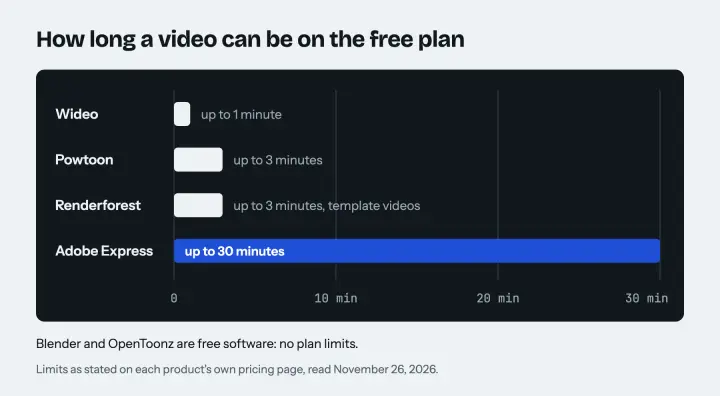
Powtoon is a browser tool for animated videos and presentations. The Free card on Powtoon's pricing page lists five things: 720p video quality, a video length of up to 3 minutes, screen recording, a Powtoon watermark, and basic templates and characters.
The comparison table further down the same page adds the rest. In the Free column:
- Included: free templates, assets and stock media; 100MB of storage; 100 screen and webcam recordings; uploading to YouTube, Vimeo and Wistia; sharing to Twitter and Facebook; commenting and collaboration.
- Not included: watermark removal; "Download: MP4, PPT, PDF"; premium templates, animations and stock; the AI credits that paid plans include and the AI features listed in the table; privacy control; commercial use.
The first paid plan, Lite, is where the watermark comes off (on 5 exports a month) and where MP4 downloads start. The page's FAQ says paid plans include commercial usage rights.
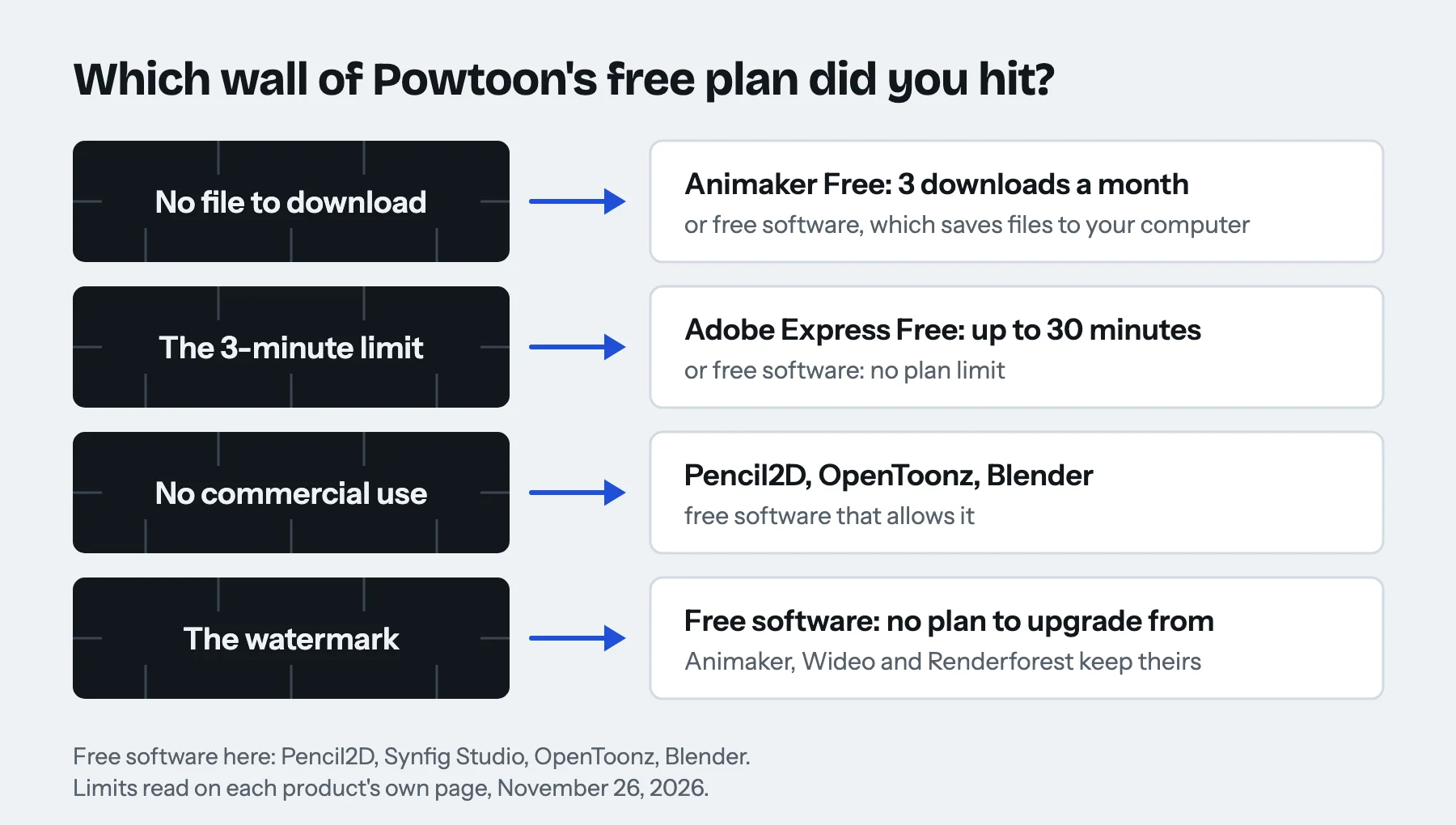
So a free Powtoon user runs into four walls: a watermark, no file to download, three minutes, and no business use. Keep those four in mind for the rest of the list. An alternative is only worth the move if it takes down the wall you hit.
How the nine were chosen
A product had to pass three checks: it is live today, it makes animation, and it has a permanent free plan or is free software. Five online makers are here (Animaker, Wideo, Renderforest, Canva and Adobe Express) and four free programs you install (Pencil2D, Synfig Studio, OpenToonz and Blender). Vyond and Biteable have no free plan today and are in their own section below.
The order below is not a ranking. Online makers come first because they work the way Powtoon does; the installed programs follow.
Powtoon and the nine alternatives in one table
| Product | What it makes | Watermark on the free plan | Free export and length | Commercial use when free | Source |
|---|---|---|---|---|---|
| Powtoon (for reference) | Animated videos and presentations | Powtoon watermark | 720p, up to 3 minutes; file download not included | Not included | Powtoon pricing |
| Animaker | Character and template animation | Animaker watermark | 3 video downloads a month; quality not stated | Listed from the Pro plan | Animaker pricing |
| Wideo | Template-based animated videos | Branded videos | Up to 1 minute; downloads marked as not included | Monetization rights marked as not included | Wideo pricing |
| Renderforest | Template videos and AI video | Small Renderforest watermark | Template videos in 720p, up to 3 minutes | Free is for personal use | Renderforest pricing |
| Canva | Designs, presentations and video with animation effects | Not mentioned on the pricing page | Video length and format not stated | Not stated on the pricing page | Canva pricing |
| Adobe Express | Motion added to designs and video | Not mentioned on the pricing page | Up to 30 minutes; no 4K | Not stated for the plan as a whole | Adobe Express pricing |
| Pencil2D | Hand-drawn 2D animation | No plans; free software | No plan limits | "Free to use, even commercially" | Pencil2D |
| Synfig Studio | 2D vector and cutout animation | No plans; free software | No plan limits | GNU GPL v3 license | Synfig |
| OpenToonz | 2D animation production | No plans; free software | No plan limits | Free for commercial projects | OpenToonz |
| Blender | 3D animation | No plans; free software | No plan limits | GPL: use for any purpose | Blender manual |
Online makers with a free plan
1. Animaker
Animaker is the same kind of tool as Powtoon: characters, templates and animation assets in the browser.
What changes. You get a file. The plan table on Animaker's pricing page gives the Free plan 3 video downloads a month, where Powtoon's table lists no download for Free. The watermark does not go away: the page's FAQ says only the free version carries the Animaker watermark. The Free column shows no video quality, no GIF downloads and no commercial rights, which begin at the Pro plan. It does list whiteboard assets, 2 custom characters and a monthly allowance of AI text-to-speech minutes.
A better fit than Powtoon for someone whose problem is the missing download, not the watermark, and who can work within three downloads a month.
2. Wideo
Wideo builds animated videos from templates.
What changes. Less than you might hope. Wideo's pricing page describes the Free plan in three lines: branded videos, 1 minute videos and 10 video templates. Downloads are listed from the Basic plan, and unbranded videos come with paid plans. Against Powtoon's free plan, the branding stays and the length limit is shorter. The comparison table marks downloads and monetization rights as not included in Free, and lists one branded upload to YouTube, Facebook and HubSpot.
A better fit than Powtoon for nobody on the free-plan facts alone. It is worth a look if you like its templates and expect to pay later: the page says all paid plans include the full graphic, music and scene libraries and a presentation mode.
3. Renderforest
Renderforest has two sides: AI video generation, and template videos that its pricing page lists as intros, promos, explainers and logo animations.
What changes. The headline numbers match Powtoon's: the FAQ on Renderforest's pricing page describes Free as unlimited template videos in 720p with a small Renderforest watermark, running up to 3 minutes. Free also includes the video editor and a small credit balance for AI generation, with AI video made at 480p and watermarked. Business use does not open up: "Free is for personal use." What is different is the way out. The same page sells a single 1080p export without a subscription and describes it as having no watermark.
A better fit than Powtoon for a one-off project, such as a channel intro or a logo animation, where paying for one export suits you more than a monthly plan.
4. Canva
Canva is a design tool that also makes video and presentations.
What changes. The kind of animation. In the comparison table on Canva's pricing page, the Free column includes "Video", "Photo and Video Animations" (described as one-click effects), "AI Voice", recordings and presentations, with 5GB of cloud storage. "Magic Animate", which applies animations to a whole design automatically, is marked as not included in Free. The table lists animation effects for photos and videos; it does not list character animation. The page says nothing about a watermark, a video length limit or commercial use on the Free plan, so check those inside the product before you rely on them.
A better fit than Powtoon for animated slides, social posts and simple motion on your own photos and clips, when you do not need cartoon characters.
5. Adobe Express
Adobe Express, like Canva, starts from design.
What changes. Length, most of all. The comparison table on Adobe's pricing page gives Adobe Express Free a video length of up to 30 minutes, against Powtoon's 3. The Free column includes "Animate All", "Dynamic Animations", "Animate Characters", video transitions and in-app recording of voice-over and video, plus 5GB of cloud storage. Export in 4K is marked as not included. A watermark is not mentioned anywhere on the page. Its only statement on commercial use is about generative AI outputs, which it says may in general be used commercially unless a feature is marked as beta.
A better fit than Powtoon for longer videos, such as a recorded lesson with animated titles, and for motion added to footage you already have.
Free software you install
These four have no plans, so there is no free tier to outgrow. What you leave behind is Powtoon's way of working. These are programs for drawing and building animation yourself, not for filling in a template.
6. Pencil2D
Pencil2D's home page calls it "an easy, intuitive tool to make 2D hand-drawn animations". It works with both raster and vector drawing, runs on Windows, macOS, Linux and FreeBSD, and the page states that it is "completely open source and free to use, even commercially!"
A better fit than Powtoon for people who want to draw frame by frame and need the result for business without a paid plan.
7. Synfig Studio
Synfig's home page describes Synfig Studio as free and open-source 2D animation software for vector and bitmap artwork. Its stated aim is to remove the need to animate frame by frame: you set key positions and the frames in between are calculated. It also has a bone system for cutout animation. It is licensed under GNU GPL v3 and is offered for Windows, Linux and macOS.
A better fit than Powtoon for character and shape animation that you want to control yourself without drawing every frame.
8. OpenToonz
The OpenToonz project page presents it as software for producing 2D animation, based on Toonz, which Studio Ghibli customized and used. The page says it "can be used free of charge for both commercial and non-commercial projects".
A better fit than Powtoon for a full hand-drawn production, from scanned drawings to finished footage, including commercial work.
9. Blender
Blender covers 3D. Its README lists modeling, rigging, animation, simulation, rendering, compositing, motion tracking and video editing. It is licensed under the GNU General Public License, and the Blender manual says this gives you the right to use the program for any purpose; it adds that the GPL applies to the application and not to the artwork you make with it.
A better fit than Powtoon for 3D work. It is the largest step away from Powtoon in this list, and the cost is learning time.
Trials, not free plans
Four more products do not have a free plan today:
- Vyond. Its plans page shows four paid plans (Starter, Professional, Enterprise and Agency), each with a "Buy Now" button, and no free plan.
- Biteable. Its pricing page shows three plans (Pro, Premium and Business), and its FAQ describes a free 7-day trial.
- VideoScribe. Its pricing page lists a 7-day free trial with 3 video downloads, a maximum video length of 5 minutes and watermarked videos.
- Doodly. Its home page offers the whiteboard software free for 14 days.
A trial is fine for finishing one video or for deciding whether to pay. It does not replace a free plan.
Which wall did you hit?
- No file to download. Animaker's Free plan lists downloads. The four free programs save files to your own computer.
- The 3-minute limit. Adobe Express Free lists up to 30 minutes. Free software has no plan limit.
- No commercial use. Pencil2D and OpenToonz say so in plain words; Blender's license allows use for any purpose. Among the online makers above, none states commercial rights for its free plan as a whole; Adobe's table ticks "Commercial Use" for Free only in its generative AI section.
- The watermark. Animaker, Wideo and Renderforest keep theirs. Canva and Adobe do not address it on their pricing pages, so check in the product. Free software has no plan to upgrade from.
If you are not sure which kind of tool you need, the sibling article on seven video animation makers compared looks at these products without the Powtoon angle, and the guide to kinds of animation software and free asset licenses explains the categories. For the working steps, see how to make your own cartoon video for free. If Powtoon's whiteboard style is what you would miss, read about whiteboard videos and hand animations first.
Narration after you switch
Powtoon's table marks its AI text to speech as not included in the Free plan. Four of the online makers above list a voice feature for Free: Animaker a monthly text-to-speech allowance, Canva "AI Voice", Wideo a text-to-speech tool with limited characters, and Adobe Express in-app voice-over recording. Where a tool has no voice feature, make the audio outside it: the Voice Recorder for your own voice, Text-to-Speech for a generated one, then import the file.
Plans change often, and several of the pages above were running limited-time offers when they were read. Open the linked page again before you start a project in any of them.
Questions and answers
Is Powtoon free?
Yes. Powtoon's pricing page lists a Free plan with 720p video quality, videos of up to 3 minutes and a Powtoon watermark. Its comparison table marks file downloads and commercial use as not included in that plan.
Can I download a video on Powtoon's free plan?
Powtoon's comparison table lists 'Download: MP4, PPT, PDF' for the paid plans and not for Free. The Free column does include uploading to YouTube, Vimeo and Wistia and sharing to Twitter and Facebook.
Which free alternatives to Powtoon have no watermark?
The four free programs in this list (Pencil2D, Synfig Studio, OpenToonz and Blender) have no plans at all. Animaker, Wideo and Renderforest state that free videos carry their branding or watermark. The pricing pages of Canva and Adobe Express do not mention a watermark for their free plans.
Does Vyond or VideoScribe have a free plan?
No. Vyond's plans page lists four paid plans and no free plan. VideoScribe's pricing page lists a 7-day free trial with 3 video downloads and watermarked videos.
Can I use a free Powtoon alternative for business videos?
Read the rights line of each one. Pencil2D and OpenToonz say they are free for commercial use, Renderforest says its Free plan is for personal use, and Animaker lists commercial rights from its Pro plan.
Sources
The facts and figures above come from these pages, each opened and read for this update. The year after each one is the year of its data or its last update.
- Powtoon plans and pricing. Powtoon, 2026. Powtoon's own pricing page with the plan cards, comparison table and FAQ.
- Animaker Pricing: Starter, Pro and Enterprise plans. Animaker, 2026. Animaker's own pricing page with the plan comparison table and FAQ.
- Pricing Guide. Wideo, 2026. Wideo's own pricing page.
- Renderforest Pricing Plans. Renderforest, 2026. Renderforest's own pricing page and its FAQ.
- Canva Pricing: Compare Free, Pro, Business and Enterprise plans. Canva, 2026. Canva's own pricing page with the plan cards and the feature comparison table.
- Pricing: Compare Free and Premium Plans. Adobe, 2026. Adobe's own pricing page for Adobe Express with the plan comparison table.
- Pencil2D Animation: Open Source animation software. Pencil2D project, 2026. The Pencil2D project's own home page.
- Synfig: Free and open-source animation software. Synfig project, 2026. The Synfig project's own home page.
- OpenToonz. Dwango (OpenToonz project), 2026. The OpenToonz project's own home page.
- About Free Software and the GPL. Blender Foundation (Blender Manual), 2026. The license page of Blender's own manual.
- Blender README. Blender Foundation, 2026. The README of Blender's source code mirror on GitHub.
- Vyond Plans and Pricing. Vyond, 2026. Vyond's own plans page.
- Biteable pricing. Biteable, 2026. Biteable's own pricing page and its FAQ.
- Pricing Plans. VideoScribe (Sparkol), 2026. VideoScribe's own pricing page and its FAQ.
- Doodly. Doodly (Voomly), 2026. Doodly's own home page.
Free tools for this
More articles
 Top 7 Video Animation Makers You Can Start Free, ComparedSeven animation tools that cost nothing to start, and what each free plan gives and holds back, taken from each product's own pricing or license page.
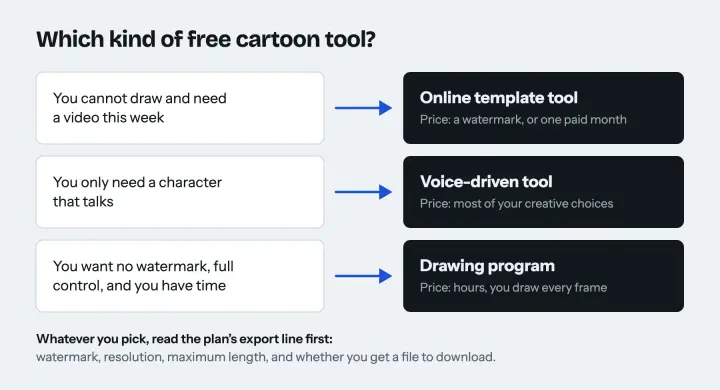 How to Make Your Own Cartoon Video for Free in 2026You can make a cartoon video without paying, but every free tool charges in some other way: a watermark, a lower resolution, a time limit or your own hours. Here is how to choose and how to get it done.
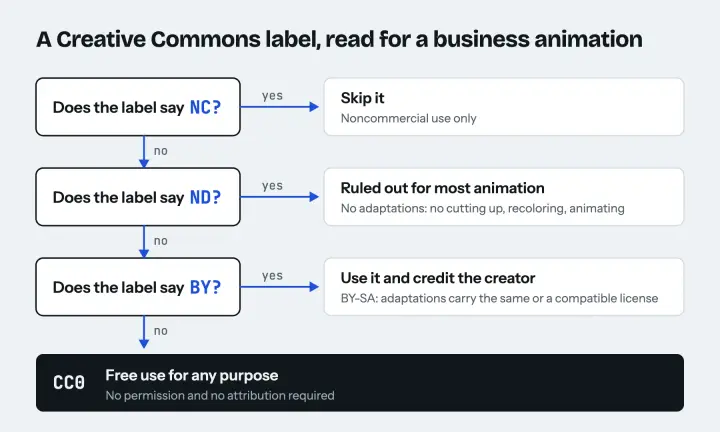 How to Create Your Own Free Animations Online in 2026Free animation is possible in 2026, but the software and the assets each come with terms. Here are the kinds of tools, the free libraries and the license points to check.